Campaigns
A campaign is one Kubernetes batch/v1 Job with
completionMode: Indexed, with one index per volume. Kubernetes and
Kueue own scheduling, retries, progress and pause.
htrflow-batch itself provides only three things:
- the wrapper
- a pure converter from campaign YAML to manifests, plus the one command that applies them
- a thin read API for the status page
There is no CronJob, no controller, and no state file in the bucket.
Two rules hold the design together:
- Pausing a campaign is a Git change (
suspend: truein the campaign file). Kueue ownsspec.suspendon a Job it has admitted and undoes any edit within seconds, sohtrflow-campaigns applyputs the same intent on the Kueue Workload'sspec.active(Queueing). - Deleting a campaign's file cancels the campaign, when the apply is
asked to prune. The next render drops the campaign from
rendered/, andhtrflow-campaigns apply --prunedeletes its Job and ConfigMap. Without pruning, the Job stays. Nothing here ever touches results already in S3.
Both rules hold only because htrflow-campaigns apply is the one thing that
applies rendered/, one apply at a time. Argo CD runs it as a hook and
never applies the directory itself, since a tool that made the cluster
match rendered/ would re-create a finished campaign's reaped Job and run
every volume again. How the command works, in order, is in
htrflow-campaigns CLI.
Everything else follows from those two rules and ordinary Kubernetes semantics. Nothing here runs on a timer, and nothing here has to stay alive for a submitted campaign to keep running.
Architecture
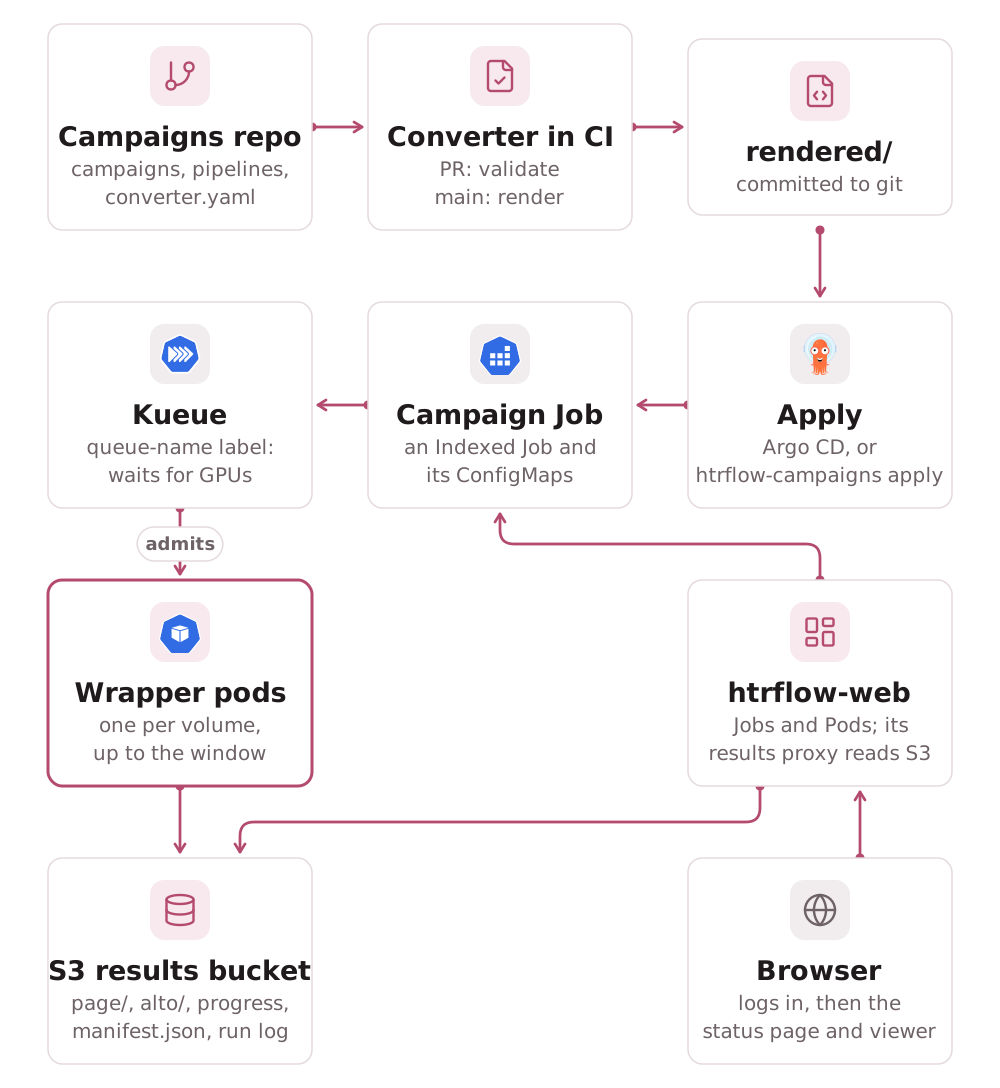
The campaigns repo
The campaigns repo is separate from htrflow-batch. Operations and code
change at different rhythms, and "new campaign" is a different kind of
review from "new feature". Its CI runs htrflow-campaigns validate on every
pull request, and on main runs htrflow-campaigns render and commits the
result under rendered/.
examples/campaigns/
shows the exact shape; htrflow-campaigns init writes it. Who may write to
this repo, and what that grants, is under
Security → Trust boundary.
converter.yaml
campaigns/
  example.yaml
pipelines/
  demo-v1.yaml
rendered/                # committed by CI on main, never hand-edited
  pipelines/demo-v1.yaml
  campaigns/example.yaml
Every field's rules are in Campaign & Pipeline YAML.
Campaign file
pipeline: demo-v1        # exactly one pipeline per campaign
priority: ""             # optional: htr-interactive / htr-bulk / htr-idle; empty is htr-bulk
window: 20               # optional: this campaign's parallelism, capped by converter.yaml's window
volumes:
  - <ref>                          # shorthand: expanded through converter.yaml's source_template, which must be set
  - id: volume-2                   # any IIIF manifest (Presentation 2 or 3), http(s) only
    manifest: https://iiif.example.org/volume-2/manifest
  - id: loose-scans                # bare image URLs: the wrapper builds
    images:                        #   a Presentation 3 manifest itself, in S3
      - https://example.org/scan1.jpg
      - https://example.org/scan2.jpg
- A volume's
idbecomes its S3 prefix,<namespace>/<pipeline>/<id>/. - A campaign is append-only. A Job's
completionsis set once, from the volume list, and Kubernetes cannot change it. Put new volumes in a new campaign file (example-2.yaml). The old results stay untouched. - One pipeline per campaign. A volume that needs different treatment goes in its own campaign file.
window:is capped byconverter.yaml'swindow, which should be what the ClusterQueue's quota can admit (Queueing → The window).- A changed recipe needs a new pipeline id and a new campaign file.
Results from
demo-v1anddemo-v2sit side by side.
Pipeline file
A pipeline id names the full recipe: the htrflow steps and the exact wrapper image that runs them.
image: <registry>/htrflow-batch@sha256:<digest>   # digest, REQUIRED
steps:
  - step: Segmentation
    ...
The wrapper stamps the image digest into every manifest.json and ALTO it
publishes, which links each result back to the recipe in git. Tags are
rejected. Which repositories an image may come from is enforced at
admission (Security → Trust boundary).
A digest pins the code, not the model weights. The warm-up pulls weights
from Hugging Face. Unless each step pins a model revision (enforceable
with the chart's security.requireModelRevision), an upstream model update
can change output under the same pipeline id. GPU nondeterminism also rules
out bit-identical reruns.
Every pipeline file also renders a warm-up Job (htr-warmup-<id>). It
runs once per recipe, on CPU, outside Kueue, and fills the model cache.
Batch pods wait in an init container for its completion marker before they
run (The model cache).
Immutability
Results are keyed by pipeline id, so a pipeline id is a permanent name for
a recipe. validate, render and apply refuse an edit to a pipeline's
image or steps while a campaign still runs it. Without that guard, an
apply would change the pipeline ConfigMap under a running campaign, and its
unstarted indexes would run a different recipe from the ones that had
finished. Once no campaign names the pipeline, keeping the id out of reuse
is a convention enforced by review. The exact rules and messages are in
Campaign & Pipeline YAML → Immutability.
What the converter renders
For each pipeline, pipelines/<id>.yaml:
ConfigMap htr-pipeline-<id>, holdingpipeline.yaml: {steps: …}.Job htr-warmup-<id>, which fills its recipe's directory of the model cache once.
For each campaign, campaigns/<name>.yaml:
ConfigMap campaign-<name>, holdingvolumes.txtwith one line per index:<id>\t<manifest-url>or<id>\timages:<url1> <url2> ….Job <name>, Indexed, with one completion per volume,parallelism = min(campaign window, converter window), three retries per index, and every index allowed to fail on its own. Exit 13 fails an index without retry, and a disruption costs no retry (Failure Handling).
Every object carries the converter's campaign, pipeline and
managed-by: converter labels. A campaign too big for one Job is split into
<name>-part1, <name>-part2, and so on. Every field of every object, on a
worked example, is in Rendered objects.
The record a campaign leaves
The Job is a window, not the record. Kubernetes deletes it
ttlSecondsAfterFinished after it finishes (a week by default), and its
completedIndexes and failedIndexes go with it. What stays is the
campaign's pair of ConfigMaps, which have no TTL:
| Object | Written by | Holds |
|---|---|---|
campaign-<name> |
render, then apply |
volumes.txt, and provenance: image-digest, campaigns-commit, applied-by, applied-at (the last apply, not the start), job-uid |
campaign-<name>-status |
the read API and apply |
phase, volumesTotal, volumesDone, volumesFailed, startedAt, finishedAt, resultsBase, jobUid, and failedVolumes (up to 50 ids, one sentence each) |
Two writers, on purpose. The read API sees the most: it reads the pods,
so it alone can say why a volume failed. But it writes only while
somebody has the status page open. apply is the one thing guaranteed to
run, so it reads each campaign's live Job before it decides anything and
writes the ending it sees. How the two share the record without
overwriting each other is in the
web package README.
What follows from the record:
- A finished campaign is not run again. An apply after the Job's TTL
finds the record, leaves the campaign alone and says so. There is no
--force: a campaign that should run again is a new campaign file (CLI → Finished campaigns). - A live Job outranks the record. While the Job exists, it alone says whether the campaign is over.
- A record counts only when it names the campaign's Job, by uid. A record left over from an earlier Job of the same name is not believed.
- The status page still shows a reaped campaign, marked "job removed",
with the phase and counts the record kept and its volumes rebuilt from
volumes.txt(Web front & read API). - A Job removed before any ending was recorded (deleted by hand, or by
a prune) leaves a row that reads
Unknown, not aRunningthat can never change.
Removing a finished campaign
Delete the campaign file when the campaign is over and you no longer want it on the status page. A pruning apply then removes both ConfigMaps. Nothing else does, and nothing expires them. The results in the bucket are not touched: removing those is a separate, deliberate step. Leaving the file costs two small ConfigMaps and keeps the campaign on the page.
The web front and status page
packages/web serves the read API and the status page from one image. It
computes every answer live from the Jobs, Pods and ConfigMaps, reads each
running volume's progress.json through the results proxy, with the
caller's session, and writes only the
status records above. Routes, fields and phases are in
Web front & read API. The bucket layout is in
S3 Layout.
Trade-offs
- Write access to the campaigns repo is a trust decision. See Security → Trust boundary.
- The results bucket is the only durable record of results. Git holds the desired state, and the cluster holds a Job for a week after it finishes by default. Nothing copies results anywhere else, so their durability is the bucket's replication, versioning and backups. Losing the bucket means recomputing every campaign.
- Volumes from arbitrary web hosts fail in ways the platform cannot
tune: hotlink blocks, auth walls, flaky hosts. There is no
pre-validation step. A bad manifest URL shows up as a failed index, with
the wrapper's own error as its
reason. - Campaign pods reach only the IIIF origins listed in
network.iiifCidrs(Security → NetworkPolicy), and whatever your own network's egress rules allow. A source outside both fails the volume at setup. - Run logs are readable by every account that may read the namespace's
prefix. They sit under
<namespace>/status/logs/, the browser needs them, and a log can carry the redacted host and path of a private IIIF source (Security → The results boundary). - A permanently failed volume has no "retry" or "skip". A rendered campaign's volume list cannot change, and its failed indexes do not get a fresh retry budget. To run a failed volume again, list it in a new campaign file on the same pipeline once the old campaign has ended.