The Wrapper
The wrapper is the process inside every campaign pod. One pod runs one index, and one index is one volume. The wrapper does the I/O in both directions (IIIF in, S3 out), the page queue, resume, output verification, provenance and the live run log. It drives htrflow in-process and owns no HTR logic.
What schedules the pod is in Queueing. The Job it runs in, field by field, is in Rendered objects. The full environment, stage and exit-code contract is in the Wrapper reference.
The image
The htrflow-batch image builds its own htrflow base from source at a pinned
commit, on the CUDA runtime image, and adds the htrflow_batch package with
its locked, hashed dependencies (.docker/htrflow-batch.dockerfile,
Releasing).
The base revision travels with the image as HTRFLOW_BASE_REVISION.
The image carries no C compiler, and torch's own kernel compilation is off
(TORCH_DISABLE_NATIVE_JIT=1). A pipeline config that opts into compilation,
such as ultralytics' compile setting or a static cache in the transformers
generation settings, is unsupported: it fails for want of a compiler.
The streaming driver
The wrapper imports htrflow as a library. It does not shell out to the
CLI. At startup it calls Pipeline.from_config() once, so the models load
once. It then runs a producer–consumer pipeline with three concurrent roles
(stream.PageStream and stream.consume()):
| Role | What it does |
|---|---|
downloader pool (stream.PageStream: threads, with DOWNLOAD_CONCURRENCY in flight and never more than LOOKAHEAD_PAGES, or LOOKAHEAD_BYTES, submitted ahead of the consumer) |
Fetches pages into tmpfs, submitted in manifest order, retrying each page with backoff. Looks in the image cache first when one is set. Refuses anything that is not a raster image. Hands pages over in manifest order, so the consumer waits on the head of the window |
| consumer (a single thread, since the GPU serializes the work anyway) | Runs pipeline.run(document) on each page, in order, as soon as that page is available. A page's lookahead slot frees only when the consumer has finished with it and its image is deleted, and that is what bounds tmpfs. Keeps each page's result or exception itself |
| uploader | Ships each page's PAGE XML and then its ALTO to S3 as soon as htrflow writes them (deterministic keys, blind overwrite). Deletes the source image and both output files once the page is done |
The consumer keeps each page's outcome because htrflow's own CLI submits pages to a thread pool and never collects the futures. A page that throws can vanish there without failing the process, so a CLI exit 0 does not prove every page was transcribed. Running pages itself fixes that at the source, and the verify stage below checks the outcome again against the bucket.
The effect:
- The GPU is idle for roughly one page's download time.
- Results stream into S3 as the run goes, so a long volume shows live progress.
- tmpfs holds only the lookahead window, never the whole volume.
The library API is not a stability contract the way the CLI is. That makes the image digest pin load-bearing: the wrapper is tested against the exact htrflow in the image (Testing).
The knobs that shape the loop
The full table, with defaults from config.py, is in the
Wrapper reference. In a deployment only the two
byte caps are set, from converter.yaml; the rest run at the defaults
below, and change only in a hand run of the image
(Configuration says who sets what).
| Env | Meaning | Default |
|---|---|---|
MAX_IMAGE_WIDTH |
IIIF size cap, enforced and part of the fetched URL (From image to transcription). Canvases without an image service are fetched at native size | 2500 |
LOOKAHEAD_PAGES |
Maximum pages downloaded ahead of the consumer (bounds tmpfs) | 64 |
LOOKAHEAD_BYTES |
Maximum bytes those pages may hold; a page still downloading counts as FETCH_MAX_BYTES |
1 GiB |
DOWNLOAD_CONCURRENCY |
Concurrent image downloads | 12 |
RESUME |
Skip pages whose PAGE and ALTO already exist and whose source URL is unchanged | true |
MANIFEST_MAX_BYTES / FETCH_MAX_BYTES |
Byte caps on the manifest and on one image body, counted on the decoded bytes | 16 MiB / 64 MiB |
DOWNLOAD_DEADLINE_SECONDS |
Wall-clock limit on one download (the manifest, or one attempt at a page), which stops a host that trickles bytes | 300 |
LOG_SHIP_SECONDS |
How often the run log is uploaded. 0 means final upload only (The run log) |
15 |
Stages around the streaming loop
Every stage name can appear in the termination message.
- config: reads and checks the environment (
Config.from_env), so a deployment fault is never reported as a manifest problem. A missing variable, orIIIF_MANIFEST_URLandIMAGESboth set, is exit 13. - setup: fetches the IIIF manifest (http(s) only, at most 5 redirects,
capped at
MANIFEST_MAX_BYTES) and turns its canvases into an ordered page list. For animages:volume it builds the manifest instead (From image to transcription). An empty manifest, a canvas with no image, a non-JSON body or a 4xx is exit 13. A 5xx, a 429, a network error or the download deadline is exit 1. - resume: lists
page/andalto/in S3. A page counts as done only when both exist and its source is unchanged: the digest stamped on its ALTO at upload (source-digestmetadata, or else its entry in the previousmanifest.json) must match the digest of the URL the manifest gives now. Credentials (userinfo and the common signing query parameters) are taken out of both sides, so a re-signed URL is not a new image; any other query change is. Every page about to be reprocessed loses its stored PAGE and ALTO first, and the previousmanifest.jsonandiiif.jsongo before them, so no marker describes outputs that are gone. Skipped pages are never downloaded.RESUME=falsereprocesses everything. - load: starts
stream.PageStream(...)downloading, then callsPipeline.from_config($PIPELINE_PATH), so the model load overlaps the first downloads. Bad YAML, an unknown step or model class, anExportstep in the YAML, or a pinned revision overridden by a key besidemodel_settingsis exit 13. AnOSErrorwhile building the models is exit 1 (The model cache). - stream: the downloader, consumer and uploader run as described above.
- Per-page failures are recorded, not fatal mid-loop. That covers a
download that failed for good, an exception from
pipeline.run, and malformed XML. The loop drains what it can first. - A download the source could not serve today is deferred, not failed. A network error, the download deadline, a 429, a 5xx, or an HTML page where the image should be is retried in the pod first. If it still fails, the page is recorded as deferred. Verify then finds it missing, so the index is retried and resume fetches only that page (From image to transcription).
pipeline.runruns behind a liveness guard. A dead htrflow worker thread, or a page that makes no progress forPAGE_TIMEOUT_SECONDS, fails that page, naming the step and model, and the pipeline is rebuilt before the next page. Progress is any step or model batch finishing, so a long page that moves is never cut off. At eight worker threads that cannot be stopped the run ends (exit 1) so the retry gets a fresh pod (A dead htrflow worker thread).- A page exported without its text is failed. After htrflow writes a page, the wrapper looks for the text htrflow recognized for it in the ALTO and the PAGE XML. If a format holds none of it, the page fails before upload, with the cause and the fix: htrflow writes a line's text only inside a region, so lines straight on the page export empty (Regions, then lines). A blank page, with nothing recognized, still publishes its empty ALTO. A page that keeps only part of its text is published, and the run log says how many lines the export is missing. That happens when a region had no line found in it and was read whole.
- An upload the store could not take is deferred too, and any half of its pair already stored is deleted. A page whose own output is bad (a missing format, malformed XML) is failed.
- Malformed XML is kept aside. A page whose ALTO or PAGE XML does
not parse is failed, and its files are stored as they came out under
failed/beside the volume's results, as plain text. The error names only a line and a column; the file shows what is there. Nothing that reads results looks infailed/, and a later attempt at the page deletes its copy first (S3 layout). - Five consecutive S3 upload failures abort the run (
UploadOutage, exit 1). - verify: every page must be uploaded to both
page/andalto/, skipped by resume, or recorded as failed with a reason. - A missing page means exit 1: an upload that never landed, or a deferred page. Kubernetes retries the index and resume converges.
- On the index's last attempt a deferred page is failed, so a source
that never serves one page cannot cost the others their
manifest.json. The wrapper reads the attempt number fromINDEX_FAILURE_COUNTandBACKOFF_LIMIT_PER_INDEX. - A failed page does not fail the volume. It would fail the same way on every attempt.
- Unless nothing succeeded. A run where every processed page failed and nothing was resumed points to a broken model or a dead GPU: exit 1. When every one of those pages failed because its export held none of its text, the cause is the pipeline instead. That is exit 13, with the cause said once in the termination message.
- publish (
publish.py): writesiiif.json,pipeline.yaml, and thenmanifest.jsonlast, as the sole completion marker. Every upload carries a real content type; a blindapplication/octet-streambreaks browsers.
SIGTERM, at any stage, writes
{"stage": …, "permanent": false, "error": "SIGTERM"} to the termination log,
ships the final run log, and calls os._exit(143) rather than wait for stuck
downloads.
Exit codes, retries and what a person is told are in Failure Handling.
Provenance in every ALTO
htrflow's own <Processing> block names htrflow, its version, the steps and
each model's commit hash. Before the upload the wrapper appends a second
block, <Processing ID="htrflow-batch"> (provenance.py), with the
processing time, image=<digest pin> (IMAGE_DIGEST),
htrflow-base=<revision> (HTRFLOW_BASE_REVISION) and the wrapper's
processingSoftware. The file stays schema-valid. An ALTO the stamp cannot
parse fails the page. PAGE XML is not stamped; the same facts are in
manifest.json. A volume resumed on a newer image keeps its earlier pages, so
their ALTOs name the image that made them while manifest.json names the one
that finished the volume.
Output store and completion contract
S3 sits behind a single seam, ResultStore:
- Key layout. Keys follow
s3://$BUCKET/$S3_PREFIX/<pipeline-id>/<volume-ref>/.... The pipeline id is in the key, so reprocessing with a better model writes to a new prefix and never overwrites the earlier results (S3 Layout). - Per-page keys. They are deterministic and overwritten blindly, so retries converge. PAGE is uploaded before ALTO, and both are parsed as XML before the first PUT. A crash between the two uploads leaves a PAGE without its ALTO, which resume reprocesses, and never the reverse. So an ALTO's presence always means the page is complete.
manifest.jsongoes last. Its presence is "volume complete" for that pipeline id. It contains:- the page count,
page_sources(page to source image URL, redacted) andcanvas_ids - the pipeline YAML and its sha256, the htrflow version and the batch image digest
- per-page results, with
pages_okandpages_failed bytes_fetched,wall_seconds,gpu_stall_secondsandpages_per_secondviewer_url- with the image cache on,
image_cache: its bucket and counts (Image cache)
The pipeline YAML is also uploaded next to it.
- Timeouts. The S3 client uses a 10 s connect timeout, a 60 s read
timeout and 3 standard retries, so a dead bucket cannot pin a run for hours.
The run-log client is tighter (Events and signals).
- Only durable state. The results bucket is the one stateful dependency
in the system. How durable the results are depends on the bucket's own
replication and backups (Campaigns → Trade-offs).
- After the Job is gone (its TTL, a week by default), "what has been
processed?" is answered by listing manifest.json keys in S3.
The viewer manifest
iiif.json is a IIIF Presentation 3 manifest with one canvas per page that
came out:
- Image. Copied from the source canvas, with its image service, so tiles keep coming from the IIIF origin and the platform serves no images. An image from a Presentation 2 manifest keeps its size and its service's own compliance level (level 0 when it names none), so the viewer asks it only for what it serves.
- Rights and reading. The source's credit line (
requiredStatement, which viewers must show),rights,summary,metadata,navDate,behaviorandviewingDirection, with Presentation 2'sattribution,license,descriptionandviewingHintturned into them. A canvas markednon-pagedstays marked. Each value is untrusted, so it is normalised to its Presentation 3 shape or left out:rightsis the first plain web URI the source names. The table of contents (structures) is not carried: its ranges name the source's canvases, not these. - Dimensions. The width-capped dimensions actually processed, so the Universal Viewer's line overlays line up without coordinate rewriting.
- Text. A
seeAlsoper canvas pointing at its ALTO URL under the results URL, with the IIIF registry's ALTO profile (http://www.loc.gov/standards/alto) andapplication/xml. The viewer's text panel takes the firstseeAlsowhose profile names ALTO. - Downloads. A
renderingper canvas for its ALTO and its PAGE XML, which the viewer's download dialog lists for the current page; that dialog never readsseeAlso. - No search service. None exists, so none is advertised. Stock UV shows the text panel only beside a search service; the web image's UV patch drops that condition, as the panel reads the ALTO and never searches.
It is stored as application/ld+json with the Presentation 3 context as
its profile, which is how the specification asks a manifest be served.
Publishing iiif.json needs RESULTS_URL, the browser-reachable URL
base, which is not the in-cluster S3 endpoint. The viewer manifest is written
after verify, under the same <pipeline-id>/<volume-ref>/ prefix, and
during the run every tenth page (From image to transcription).
The browser fetches the manifest and the ALTO from the results proxy, on the
web front's own origin, which reads them from the bucket with the logged-in
person's keys: the bucket needs no anonymous read and no CORS
(Security → The results boundary).
The viewer's own patches are described in
Web front & read API.
Image cache
A deployment can keep the source images in a private S3 bucket, so a volume
run again (a retry, another pipeline, another campaign) needs nothing from
the IIIF server
(Deploy → Cache source images).
It is off unless converter.yaml sets image_cache.bucket. That renders
IMAGE_CACHE_BUCKET into every campaign pod. The key, and what the bucket
must never be, are in
S3 Layout → Image cache bucket.
Per page, inside the downloader pool (From image to transcription):
- Lookup. The page's key is fetched from the bucket.
- Hit. The object is checked exactly like a download (raster signature,
FETCH_MAX_BYTES,MAX_IMAGE_PIXELS) and then used. The IIIF server is not contacted. - Miss. No object, one that fails the checks, or one made from another source image. The page is downloaded as it would be without a cache, then stored under its key, overwriting the old object.
- The object records its source. A store writes the page's source identity (its image URL without the IIIF size or credentials, hashed) into the object's metadata. A page whose source changed, which resume sends back to be fetched, or a volume id reused for another volume, never gets the old image.
The cache speeds a run up, and the run never depends on it:
- It never fails or defers a page. A GET error sends the page to the download. A failed store is logged, and the page stays ok.
- A cache-wide problem is logged once per run, not once per page. A missing or unreadable bucket is one line that names it. The wrapper never creates the bucket.
- A volume with a page index past 99999 is not cached at all, with one log line, because the key's page number has five digits.
- The results bucket is never the cache. It holds the results people
read, so an
IMAGE_CACHE_BUCKETthat names it turns the cache off, with one log line. - The key has no width. A hit serves the image at whatever width first
stored it. A pipeline asking for a larger
MAX_IMAGE_WIDTHgets the cached size.
With the cache on, the run says what it did in two places. manifest.json
gains "image_cache": {"bucket", "hits", "misses", "stored"}, and the run
log gets one line with the same counts:
[R0001203] image cache images-batch: 12 hits, 3 misses, 3 stored
bytes_fetched keeps its meaning: bytes downloaded from the IIIF server,
never bytes read from the cache. The same volume run again under another
pipeline hits every page the first run stored, and a volume served wholly
from the cache reports bytes_fetched: 0. With the cache off, neither the key nor the
line appears, and manifest.json is as it was.
Model handling
A Job pays two separate model costs. Don't mix them up.
| Cost | When it is paid | Size |
|---|---|---|
download (Hugging Face Hub to HF_HOME) |
Once per pipeline, by the warm-up Job, never by a batch Job | The pipeline's model weights, off the GPU's clock entirely |
load (HF_HOME to GPU) |
Every Job. Pipeline.from_config() builds the step models eagerly, and every pipeline.run(page) reuses them |
Seconds to a minute, which averages out to noise over a volume |
The cache is pre-warmed and read-only for Jobs. Batch Jobs mount the
cache PVC readOnly with HF_HUB_OFFLINE=1 and have no route to Hugging
Face Hub. The only writer is the warm-up Job (htrflow_batch.warmup): the
same image and pipeline ConfigMap, on CPU, outside the Kueue queue, calling
Pipeline.from_config(). Building the pipeline is the download, so exactly
the files a Job will load land in the cache.
The warm-up exits 13 for a pipeline that is wrong (invalid YAML, an unknown
step or model class, a model repo or revision that does not exist) and 1 for
one that is merely unlucky (a network or disk error). It mounts no S3
Secret, so its {stage: "warmup", permanent, error} termination message is
the only place the failure reaches a person: the campaign card's warm-up chip
(Web front & read API).
Models are never baked into the image. Every model reaches the GPU only
through this cache, so a model change needs no image rebuild and no Job
downloads while holding its GPU. The wrapper only sees HF_HOME, so changing
where the cache comes from is a mount-point swap.
One transformers line. The image runs transformers 5. A model saved by transformers 5 cannot be read by 4.x, or decodes subtly wrong under it, while the models saved by 4.x read the same text under 5, so every pipeline runs on the same image and none has to pick a line.
The model cache
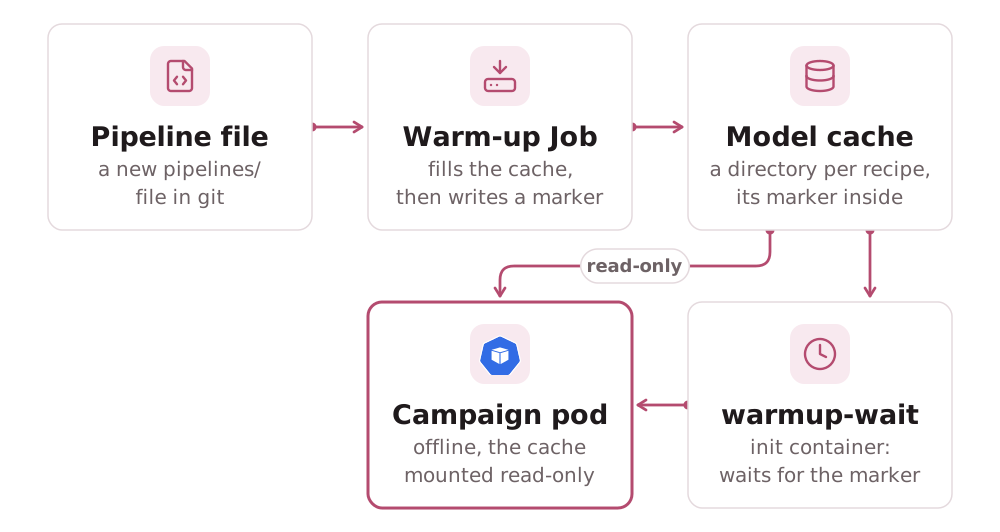
One directory per recipe. The PVC is split into one directory per
recipe, <pipeline-id>-<recipe sha256>, where the recipe hash covers the
pipeline's steps and its image. The converter narrows every mount of the
PVC to that directory with a subPath, so inside a pod it is simply
/data, and the paths below are the same whichever recipe a pod runs. Two
things follow:
- A changed recipe is a new, empty directory. A new image can load other files for the same steps, so its campaigns wait for its own warm-up rather than pass the gate on the old recipe's marker.
- No two pipelines share one. A warm-up runs its pipeline author's model
code (a YOLO
.ptfile is a pickle), so each writes only its own directory, and campaign pods read only theirs. Two pipelines that load the same model keep a copy each, and the PVC must be sized for that.
What is cached. Each recipe's directory holds the Hugging Face Hub
snapshots in the library's default layout (HF_HOME=/data/hf, so
/data/hf/hub/models--<org>--<name>/snapshots/<revision>/…) and the warm-up
marker /data/warmup/<pipeline-id>.done (warmup.py). A batch pod's
warmup-wait init container checks only the marker, never hub/.
The PVC. One PersistentVolumeClaim, modelCache.name in the chart
(templates/modelcache.yaml), sized by modelCache.*
(Chart Values). converter.yaml's data_pvc must
name the same object, which test_chart_agreement.py checks. The default
access mode is ReadWriteOnce. The warm-up mounts it read-write, campaign
pods readOnly: true.
Who fills it, and when. The warm-up Job fills it, once per recipe, at
apply time. The converter renders one htr-warmup-<id> Job for every file
in pipelines/, alongside its htr-pipeline-<id> ConfigMap. Re-applying an
unchanged Job changes nothing, so a completed warm-up runs once. A pruning
apply deletes the warm-up Job and ConfigMap of a pipeline file that is gone.
- Placement. The warm-up Job carries the campaign Job's
runtimeClassName,nodeSelectorandtolerations(the sameconverter.yamlkeys), so warm-up and batch pods land in the same node pool. - No TTL. The warm-up Job is never reaped, so an unchanged apply leaves a completed one alone. A failed warm-up is different: the next apply deletes and recreates it, so it retries on its own. A completed warm-up whose marker is gone (a replaced or wiped cache PVC) must be deleted by hand before the next apply re-warms it (Troubleshooting). The chart itself renders no warm-up Job.
- Campaign pods never fill the cache.
HF_HUB_OFFLINE=1turns any attempted download into a local error rather than a network call. Of the two NetworkPolicies, onlyhtr-warmupgets public egress on port 443.htr-batch-jobgets DNS, S3 and the IIIF CIDRs innetwork.iiifCidrs, so a batch pod has no path to Hugging Face Hub even withHF_HUB_OFFLINEunset (Security → NetworkPolicy).
Private models. A private or gated model needs a Hub token on the
warm-up only: converter.yaml's hf_token_secret names the Secret, and
campaign pods never get it
(Deploy).
How a campaign pod waits for it. The warmup-wait init container polls
for /data/warmup/<pipeline-id>.done every 10 s. It waits at most
converter.yaml's warmup_wait_seconds (default 900), or the pod's own
activeDeadlineSeconds minus one poll step if that is smaller. The wait is
bounded because the pod holds its GPU, and Kueue's quota for it, for as long
as the init container runs. Past that bound, the init container prints the
marker path and exits 13, and the Job's podFailurePolicy turns that into
FailIndex for the index. A retry would only hold the GPU again for a marker
that is not coming
(Failure Handling).
A cache miss during a run. A model missing from /data/hf when a batch
pod loads it (a wiped cache, an incomplete download, a replaced PVC) raises
LocalEntryNotFoundError under HF_HUB_OFFLINE=1. The wrapper classifies it
as transient, exit 1, so the index is retried and succeeds once the cache
is re-warmed, rather than failing for good.
Growth and cleanup. Nothing prunes the cache. A retired pipeline's directory, snapshots and marker included, stays on the PVC after its warm-up Job is gone. Removing it needs PVC access, and the apply has none.
Several nodes. A ReadWriteOnce cache pins every warm-up and batch pod
to the node the volume is attached to, which is fine for one GPU node. To
scale out, use a ReadWriteMany volume on a shared filesystem class (NFS,
CephFS), or one cache per node. The warm-up and the read-only mount work the
same either way.
The commands to inspect the cache, find a recipe's directory and force a re-warm are in Troubleshooting.
Pipeline configs
Pipeline YAMLs use the upstream format: any steps: document the stock CLI
accepts, with its step names, model names and generation settings. The one
exception is Export steps, which the wrapper appends itself for alto and
page. A pipeline travels from authoring to a result in five steps:
- Declare. Write
pipelines/<id>.yamlin the campaigns repo: thesteps:document plus the digest-pinnedimage:(Campaign & Pipeline YAML). - Deploy. The converter renders one ConfigMap per pipeline id,
htr-pipeline-<id>. It holds only thesteps:document, with its sha256 as thepipeline-sha256annotation. A changed pipeline gets a new id, never an in-place edit:validateandrenderrefuse an edit while a rendered campaign still names the pipeline,applyrefuses one while a campaign in the cluster still runs it, and beyond that it is review on the campaigns repo (Campaign & Pipeline YAML → Immutability). - Select. The campaign's
pipeline:setsPIPELINE_ID, which places the S3 keys, and mounts that ConfigMap.PIPELINE_PATHpoints at the file inside it. The same volume under a different pipeline writes under a different prefix and never over the first run's results. - Run. The wrapper calls
Pipeline.from_config($PIPELINE_PATH). To htrflow, it is just a file. - Provenance. The wrapper records the YAML, its sha256 and the image
digest in
manifest.json, and uploads the YAML next to the results. It also stamps the image digest and htrflow base revision into every ALTO (Provenance in every ALTO). Every result stays explainable without the cluster.
Validation happens before the GPU. The warm-up Job is the deploy-time
dry run of Pipeline.from_config(). Broken YAML or unresolvable models fail
there, on CPU, and the pipeline's campaigns stop at their gate instead of
using up GPU time.
Memory bounds
tmpfs is accounted memory. Its pages count against the container's memory
limit, so running out is an OOMKill, not a polite eviction: exit 137, no
termination message, no final log ship, and a viewer that polls forever. An
emptyDir eviction is no better. It carries DisruptionTarget, which the
Job's Ignore rule swallows, so the attempt goes uncounted and the index is
retried, holding a GPU each time. The design therefore keeps the wrapper's
footprint flat in the number of pages. Two things would otherwise grow with
the volume, and both are bounded:
- Page files leave the workdir with the page.
stream.consumeunlinks the downloaded image and both XML outputs as soon as the page's outcome is recorded (stream.discard). A page that fails after writing one format but not the other discards what it wrote before raising (driver.process_page), becauseconsumecan only reach the files a page returns. - htrflow's progress registries are emptied per page.
htrflow.progresskeeps module-global registries keyed byDocumentand never removes entries. The wrapper runs one long-livedPipelineover a whole volume, sodriver.release_documentsempties them once each page is done.
Nothing downstream needs a file to stay local. Resume and verify list S3, and
publish keeps each page's width and height from the parse before its first
PUT (store.page_dims), so a volume publishes without reading its ALTOs back.
Only pages a previous run published are fetched again.
| Item | Bound |
|---|---|
| Model weights and the torch runtime | Set by the pipeline's models, not by the volume |
| Page images in flight | LOOKAHEAD_PAGES (64) pages, and at most LOOKAHEAD_BYTES (1 GiB, half the tmpfs) |
| Outputs awaiting upload | One page's PAGE and ALTO |
The source manifest and its PageRef list |
At most MANIFEST_MAX_BYTES (16 MiB) |
Per-page outcomes (StreamStats.results) and dimensions (store.page_dims) |
A few hundred bytes per page |
| Run-log buffer | At most 4 MiB (logship.CAP_BYTES) |
tmpfs sizeLimit |
2 Gi |
| Pod memory request | 8 Gi (manifests/campaign-job.yaml, and what Kueue's quota must cover) |
| Pod memory limit | 16 Gi (what tmpfs and the OOM killer see) |
The last three rows are the Job's defaults. A pipeline that names a
pod size takes its size's
workdir as the tmpfs sizeLimit, half of it as LOOKAHEAD_BYTES, and its
memory as request and limit alike.
- Width capping is mandatory, and the wrapper enforces it for canvases with an IIIF image service. Uncapped masters would still fit the window, but they waste IIIF bandwidth and slow the fetch path for detail HTR cannot use.
- Canvases without a service (
images:volumes, static painting bodies) cannot be downscaled on the server. They are fetched at native size, and htrflow processes the full-resolution image. The only bound isFETCH_MAX_BYTES(64 MiB per image by default), so keep such image lists pre-sized. - A disk-backed workdir is a Job-manifest change, with no wrapper flag:
the wrapper only sees
WORKDIR_PATH, so swap the tmpfsemptyDirfor a disk-backed one.