From image to transcription
This page follows one page from start to finish. Everything here happens inside a single wrapper pod, which runs one campaign index and so one volume. The volume-level view is The Wrapper.
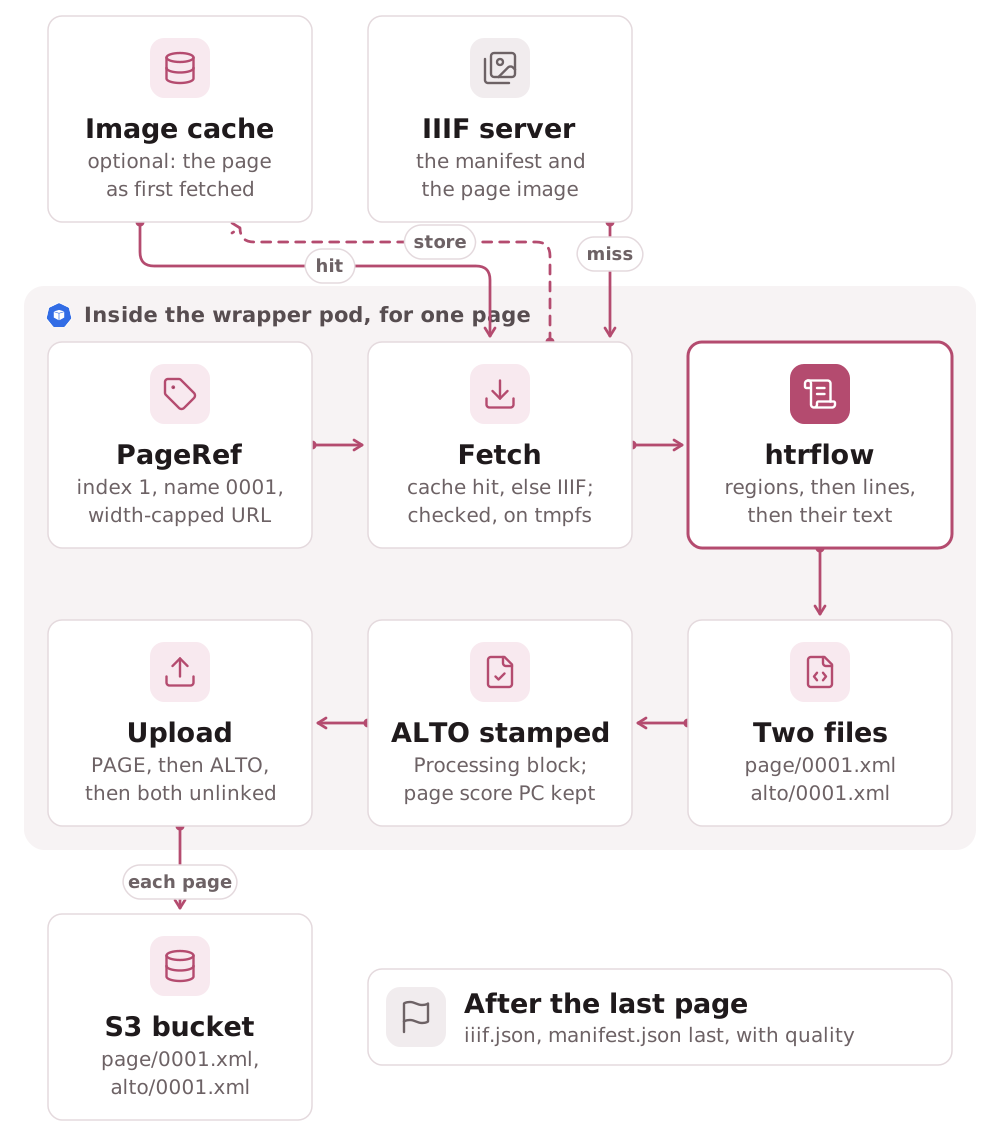
The source
The setup stage fetches the campaign's IIIF manifest: Presentation 2 or 3,
http(s) only, at most 5 redirects, capped at MANIFEST_MAX_BYTES, and
within DOWNLOAD_DEADLINE_SECONDS.
An images: volume has no manifest, so the wrapper makes the canvases:
one per URL, with the bare URL as the painting body. They stay in memory. A
Presentation 3 canvas must have a size, and an image's is known only once it
is fetched, so the only manifest published is the volume's iiif.json.
Each canvas becomes a PageRef with three fields: a 1-based index, a
zero-padded name (0001), and the URL to fetch.
A canvas can offer more than one image: several painting annotations, a
Choice, or a list of bodies. One rule picks the image, and both the
fetch URL and the image in the published viewer manifest come from it. That
way the ALTO is always drawn over the image it was read from. The rule takes
the first image whose URLs are all http(s). If there is none, the page is
still fetched and transcribed, but the viewer manifest shows no image for it.
The width-capped GET
For a canvas with an IIIF image service, the URL is
<service>/full/<MAX_IMAGE_WIDTH>,/0/default.jpg. The service is the first
entry of the image's service list that is an image service, so an auth or
search service listed ahead of it is passed over. Four deliberate choices
shape the URL:
w,rather than!w,h. Some image servers answer 501 to the best-fit form, and every server from level 1 up supports the width form.- The whole image when it is already narrower than the cap. Level 1 servers refuse upscaling. Both the canvas's width and the painting body's must be within the cap, as neither is always the service image's: a canvas is a coordinate space, and a body is often a sized derivative. A wrong guess the other way costs one refused request and the fallback below, never a full-resolution master.
- The whole image is
fullin Image API 2 andmaxin 3. Version 2 requiresfullat every level and makesmaxoptional; version 3 requiresmaxand dropsfull. The version comes from the service's type, context or profile, and a service that names none is taken for version 3. - A refusal asks the image what it has before the page fails. A sized
request answered 400 (Image API 3), 404 or 501 (Image API 2), or 403 (a
static level 0 host with no file at that size) makes the wrapper read the
image's
info.jsonand ask once more: for the whole image if that is within the cap, else the largest size the service lists within it (all a level 0 service offers, in its version's canonical form,w,orw,h), else itsmaxWidthwhen that is below the cap, and the whole image only when none of these is known. Aninfo.jsonover 1 MiB counts as none known.
A canvas with no image service cannot be resized on the server. It is
fetched at native size, bounded only by FETCH_MAX_BYTES.
The body is checked before it is kept. A textual Content-Type is refused.
The first chunk must start with a known raster signature. An empty or
oversized body is rejected. Without these checks, a login page served with a
200 would be saved as the image and waste a whole attempt inside htrflow.
Two limits bound what one download can cost, whatever the host sends:
- Size is counted after decoding. The wrapper asks only for
gzipand inflates it a chunk at a time, stopping atFETCH_MAX_BYTES. Any otherContent-Encodingis refused before it is decoded. A small compressed body can no longer expand into gigabytes in memory. - Time is wall-clock. Each attempt has
DOWNLOAD_DEADLINE_SECONDS. When it runs out, the connection is cut, whether the host is still sending the headers or the body. A read timeout alone would restart with every byte.
A failure is either the page's or the source's:
| Failure | Retried in the pod | If it persists |
|---|---|---|
| Network error, deadline, 408, 425, 429, 5xx except 501 and 505, an HTML or empty answer | Yes: 4 attempts, 2 s then doubling, or the Retry-After wait if longer (at most 60 s) |
The page is deferred. Verify finds it missing, the index is retried, and resume fetches only that page |
Any other status, a body over a cap, an unrequested encoding, an image over MAX_IMAGE_PIXELS |
No | The page is failed and recorded in manifest.json. The volume still completes |
A 400 on a sized request is the one exception: it is asked once more, as above, without spending an attempt.
Uploads fail the same two ways. Outputs the store refuses as bad (a missing format, XML that does not parse) fail the page. A PUT that still fails after the S3 client's own retries is the store's condition, not the page's: the page is deferred like an unreachable source, and five in a row end the run as transient. On the index's last attempt a page still deferred is recorded as failed instead, so the volume completes with every other page.
The image lands in /work/input/. That directory is on the memory-backed
emptyDir (sizeLimit: 2Gi), which also holds /work/outputs/{alto,page}/
and, under readOnlyRootFilesystem with nowhere else to write, HOME,
TMPDIR and YOLO_CONFIG_DIR.
The image cache
A deployment can switch on an optional S3 image cache (Deploy → Cache source images). With it on, the fetch looks in the cache before the width-capped GET:
- The lookup. One S3 GET of the page's key, built from the volume's
reference code and the
PageRef'sindex(S3 Layout → Image cache bucket). - A hit is checked like a download: a known raster signature,
FETCH_MAX_BYTESandMAX_IMAGE_PIXELS. A hit that passes is the page's image, and the IIIF server is not asked for it. - A miss takes the width-capped GET above. A miss is no object, a cached object that fails the checks, or one that records another source image. The object's metadata names the source it was stored from, so a page whose source changed never gets the old image. Once the download succeeds, the image is stored under the same key, so a bad object is overwritten.
- The cache never fails a page. A GET error falls back to the download, and a store that fails is logged while the page stays ok. A missing or unreadable bucket is logged once, by name.
- The width is not in the key. A hit serves the image at whatever width
first stored it, so a pipeline asking for a larger
MAX_IMAGE_WIDTHgets the cached size. The ALTO'sPagedimensions are still those of the image actually processed, so the viewer's overlays line up.
bytes_fetched in manifest.json counts only bytes downloaded from the
IIIF server. A volume served entirely from the cache reports 0. The hits,
misses and stores are counted separately
(The Wrapper → Image cache).
What htrflow does to it
Every Inference step runs its model on the document's leaf nodes and
attaches the results there. That is why step order is the whole recipe. Here
is the three-step pipeline in .docker/pipeline-demo-v1.yaml:
| Step | Runs on | Leaves behind |
|---|---|---|
Segmentation (yolov9-regions-1) |
the page | regions attached to the page |
Segmentation (yolov9-lines-within-regions-1) |
those regions | lines attached to each region |
TextRecognition (TrOCR) |
those lines | a transcription on each line |
The two levels of segmentation are required. htrflow's ALTO template walks
document.regions and then region.regions to emit TextBlock and
TextLine. A pipeline that recognises text straight off the regions, like
the two-step starter in examples/campaigns/pipelines/demo-v1.yaml, produces
TextBlocks with no TextLine inside. The serializer "will always produce a
file, but the file may be empty".
The wrapper appends the two Export steps itself. It rejects a pipeline file
that already contains one.
The two files
The ALTO file has three parts:
- a
Description: measurement unit, source file name, htrflow'sProcessingblock and then the wrapper's - a
ReadingOrder - a
Layout, whosePagecarries the dimensions of the image actually processed. That is the width-capped fetch, or native size when the canvas has no image service.
<Page WIDTH="2864" HEIGHT="2288" PHYSICAL_IMG_NR="0" ID="_0001">
  <PrintSpace>
    <TextBlock ID="block_0" HPOS="792" VPOS="286" HEIGHT="1405" WIDTH="1843" CS="false">
      <TextLine ID="block0_line0" HPOS="1583" VPOS="1535" HEIGHT="150" WIDTH="787">
        <Shape><Polygon POINTS="2370,1535 2272,1558 …" /></Shape>
        <String CONTENT="Comminist loci." />
      </TextLine>
      …
PAGE XML carries per-line confidence scores and supports nested segmentation,
so it is the richer of the two formats. It is not stamped. The same
provenance facts are in manifest.json.
Between htrflow's Export and the upload, the wrapper appends a second
Processing block to the ALTO. It names the image digest, the htrflow base
revision and the wrapper package
(Provenance in every ALTO). If the
wrapper cannot parse an ALTO, the page fails.
The models named in htrflow's own block are the ones the campaign card lists, each linked to its Hugging Face repo at the pinned revision (Web front & read API).
Upload, then delete
Both files are parsed before the first PUT. They are then uploaded PAGE
first, ALTO second, so an ALTO's presence always means the page is
complete; a crash between the two leaves a PAGE that resume reprocesses.
Both PUTs carry the digest of the page's source image as object metadata
(source-digest), which is what a later resume compares. The ALTO's Page
dimensions are kept in memory, so iiif.json is written later without
reading an ALTO back.
Then comes the rolling delete. The image and both XML files are unlinked as soon as the page's outcome is recorded, since nothing downstream needs them.
After the last page, the wrapper writes three objects:
iiif.json, skipped entirely if no page's dimensions resolvedpipeline.yamlmanifest.json, last
What the page's outcome publishes
When the outcome is recorded, the wrapper also rewrites progress.json next
to the results (S3 Layout). It holds:
- the stage
pages_done,pages_totalandpages_failed- the last page
- the most recent failure
- the run's error count
The error count covers ERROR and worse only. A benign WARNING, such as a pipeline rebuild after a dead worker thread, must not light the campaign page's notice chip on a healthy run.
Every tenth page (PUBLISH_EVERY_PAGES), the wrapper also republishes
iiif.json with the pages finished so far. It sets viewer_published: true
once that PUT has actually succeeded. This is why a large volume can be
watched, and opened in the viewer, before its last page. Nothing else the pod
does leaves the pod until publish.
On a resumed run, the interim publish is skipped while the dimensions this
process holds cover fewer pages than pages_done. Otherwise it would
overwrite a complete iiif.json with one naming only the pages since the
resume.
Both writes are best-effort, and neither can fail a page. A status write that
raises is logged and dropped. Neither write touches the order that matters:
PAGE, then ALTO, and eventually manifest.json last.
Where a later run touches this page again
- Resume treats the page as done only if both files exist and its source digest still matches; a done page is never downloaded, nor looked up in the image cache (The Wrapper).
- Verify lists S3 once more after the loop. A page missing from either format, and not recorded as failed, means exit 1 and a retry. So does a deferred page, even if an earlier run left files for it.
- The viewer opens the volume's source manifest until an
iiif.jsonhas actually been published, theniiif.json. The campaign page switches onprogress.viewerPublished, never on a page count.
Known limits
- One slow page holds up the pages behind it. The consumer waits on the head of the lookahead window, so a single slow or retrying IIIF fetch stalls every page already on disk behind it.
- Resume compares only the source URL. If a pipeline's models or image
change while the pipeline id stays the same, resume keeps every finished
page. The fresh
manifest.jsonthen claims the new recipe produced them all. The immutability convention (Campaign & Pipeline YAML → Immutability) is what prevents this. - Provenance is partial. The wrapper's ALTO block names the image and the htrflow base, but not the campaign, the volume or the source image URL. PAGE XML carries no provenance of its own.